Introducing TurboSignals
My last article on Callback Strategies highlighted some pretty severe performance differences between my Runnable strategy, as3signals by Robert Penner, and Flash’s native Event system. My simple Runnable technique had an artificial advantage though: it was not a proper library but instead a little bit of code built right into the test app. Today I’m introducing TurboSignals as an AS3 library making use of the Runnable technique.
Basics
TurboSignals is a simple library. It includes signal classes for up to ten parameters (Signal0, Signal1, …, Signal10) as well as a class for var args (SignalN). These are paired with slot interfaces (Slot0, Slot1, …, Slot10 and SlotN) that you implement in order to receive the signal’s callback. The purpose of an explicit slot type is to avoid using a Function variable, which is very slow. This was shown in my article on Runnables along with how Runnables are a good strategy for avoiding that slowdown. Some helper classes (FunctionSlot0, FunctionSlot1, …, FunctionSlot10 and FunctionSlotN), however slow, are provided for when you really want to provide an arbitrary function.
Advanced Features
One nicety of TurboSignals is that the dispatch operation is “safe” insomuch as that calls to addSlot, removeSlot, and removeAllSlots will not affect which slots are called. One drawback though is that parameters to dispatch are all untyped (*) and therefore there is no compile-time checking of the parameters and the possibility exists that there will be type errors at runtime. This is true too in the Event/EventDispatcher system as well as as3signals, only the latter explicitly checks for this problem at runtime to give more informative errors.
Usage Example (faster)
This example runs at maximum speed, which is probably not needed for simple button clicks.
import com.jacksondunstan.signals.*;
public class Button extends Sprite
{
	public var clicked:Signal0 = new Signal0();
	public function Button()
	{
		addEventListener(MouseEvent.MOUSE_DOWN, onMouseDown);
	}
	private function onMouseDown(ev:MouseEvent): void
	{
		this.clicked.dispatch();
	}
}
public class MainMenu implements Slot0
{
	public function MainMenu(button:Button)
	{
		button.clicked.addSlot(this);
	}
	public function onSignal0(): void
	{
		trace("button was clicked");
	}
}
Usage Example (slower)
This example allows you to make your callback private and name it as you wish, courtesy of the FunctionSlot0 adapter class.
import com.jacksondunstan.signals.*;
public class Button extends Sprite
{
	public var clicked:Signal0 = new Signal0();
	public function Button()
	{
		addEventListener(MouseEvent.MOUSE_DOWN, onMouseDown);
	}
	private function onMouseDown(ev:MouseEvent): void
	{
		this.clicked.dispatch();
	}
}
public class MainMenu
{
	public function MainMenu(button:Button)
	{
		button.clicked.addSlot(new FunctionSlot0(onButtonClicked));
	}
	private function onButtonClicked(): void
	{
		trace("button was clicked");
	}
}
Usage Example (complex)
This example runs at maximum speed with multiple buttons.
import com.jacksondunstan.signals.*;
public class Button extends Sprite
{
	public var clicked:Signal1 = new Signal1();
	public function Button()
	{
		addEventListener(MouseEvent.MOUSE_DOWN, onMouseDown);
	}
	private function onMouseDown(ev:MouseEvent): void
	{
		this.clicked.dispatch(this);
	}
}
public class MainMenu implements Slot1
{
	private var __button1:Button;
	private var __button2:Button;
	public function MainMenu(button1:Button, button2:Button)
	{
		__button1 = button1;
		__button2 = button2;
		button1.clicked.addSlot(this);
		button2.clicked.addSlot(this);
	}
	public function onSignal1(target:*): void
	{
		if (target == __button1)
		{
			trace("button 1 was clicked");
		}
		else if (target == __button2)
		{
			trace("button 2 was clicked");
		}
	}
}
Parameter Passing Strategy
As you can see from above, functionality from alternative systems can be emulated in TurboSignals by simply adding more event parameters. The Event/EventDispatcher system’s Event.target is attained by simply passing a reference to this as a parameter to dispatch. Likewise, the type field can easily be passed. You may also choose to pass objects like Event that include these too, which may help with speed as multiple arguments slow down the dispatch operation.
Performance Data
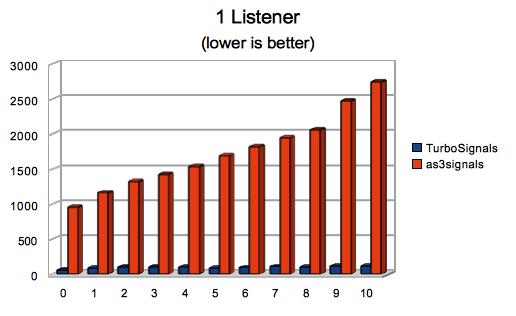
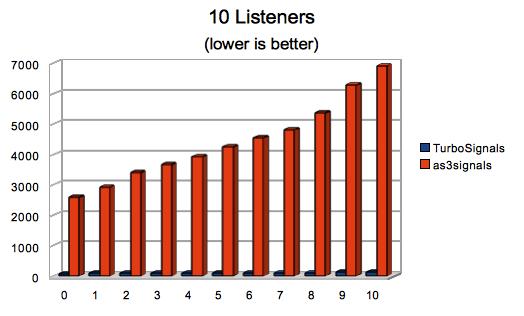
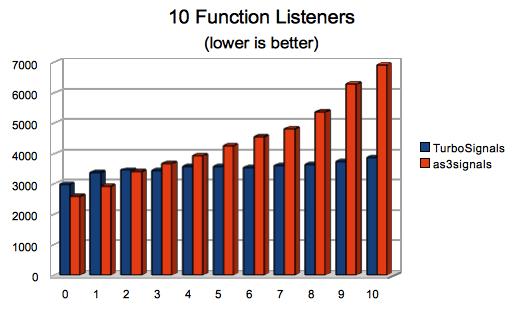
The TurboSignals distribution includes a suite of performance tests for TurboSignals as well as as3signals and Event/EventDispatcher. Here are the results for the first version:
TurboSignals – 1 Listener (1000000 dispatches)
| Environment | 0 | 1 | 2 | 3 | 4 | 5 | 6 | 7 | 8 | 9 | 10 | N |
|---|---|---|---|---|---|---|---|---|---|---|---|---|
| 2.2 Ghz Intel Core 2 Duo, 2GB, Mac OS X 10.6 | 56 | 91 | 98 | 97 | 101 | 90 | 94 | 107 | 104 | 116 | 119 | 1917 |
TurboSignals – 10 Listeners (1000000 dispatches)
| Environment | 0 | 1 | 2 | 3 | 4 | 5 | 6 | 7 | 8 | 9 | 10 | N |
|---|---|---|---|---|---|---|---|---|---|---|---|---|
| 2.2 Ghz Intel Core 2 Duo, 2GB, Mac OS X 10.6 | 317 | 600 | 570 | 585 | 567 | 606 | 582 | 562 | 580 | 614 | 628 | 7679 |
TurboSignals – 1 Function Listener (1000000 dispatches)
| Environment | 0 | 1 | 2 | 3 | 4 | 5 | 6 | 7 | 8 | 9 | 10 | N |
|---|---|---|---|---|---|---|---|---|---|---|---|---|
| 2.2 Ghz Intel Core 2 Duo, 2GB, Mac OS X 10.6 | 317 | 600 | 570 | 585 | 567 | 606 | 582 | 562 | 580 | 614 | 628 | 7679 |
TurboSignals – 10 Function Listeners (1000000 dispatches)
| Environment | 0 | 1 | 2 | 3 | 4 | 5 | 6 | 7 | 8 | 9 | 10 | N |
|---|---|---|---|---|---|---|---|---|---|---|---|---|
| 2.2 Ghz Intel Core 2 Duo, 2GB, Mac OS X 10.6 | 2985 | 3359 | 3449 | 3433 | 3551 | 3564 | 3534 | 3597 | 3624 | 3731 | 3862 | 22184 |
as3signals – 1 Function Listener (1000000 dispatches)
| Environment | 0 | 1 | 2 | 3 | 4 | 5 | 6 | 7 | 8 | 9 | 10 | N |
|---|---|---|---|---|---|---|---|---|---|---|---|---|
| 2.2 Ghz Intel Core 2 Duo, 2GB, Mac OS X 10.6 | 954 | 1158 | 1326 | 1418 | 1534 | 1696 | 1818 | 1951 | 2055 | 2467 | 2740 | n/a |
as3signals – 10 Function Listeners (1000000 dispatches)
| Environment | 0 | 1 | 2 | 3 | 4 | 5 | 6 | 7 | 8 | 9 | 10 | N |
|---|---|---|---|---|---|---|---|---|---|---|---|---|
| 2.2 Ghz Intel Core 2 Duo, 2GB, Mac OS X 10.6 | 2568 | 2908 | 3394 | 3656 | 3918 | 4249 | 4535 | 4805 | 5354 | 6288 | 6912 | n/a |
Event/EventDispatcher – 1 Function Listener (1000000 dispatches)
| Environment | 0 | 1 | 2 | 3 | 4 | 5 | 6 | 7 | 8 | 9 | 10 | N |
|---|---|---|---|---|---|---|---|---|---|---|---|---|
| 2.2 Ghz Intel Core 2 Duo, 2GB, Mac OS X 10.6 | n/a | 4886 | n/a | n/a | n/a | n/a | n/a | n/a | n/a | n/a | n/a | n/a |
Event/EventDispatcher – 10 Function Listeners (1000000 dispatches)
| Environment | 0 | 1 | 2 | 3 | 4 | 5 | 6 | 7 | 8 | 9 | 10 | N |
|---|---|---|---|---|---|---|---|---|---|---|---|---|
| 2.2 Ghz Intel Core 2 Duo, 2GB, Mac OS X 10.6 | n/a | 33755 | n/a | n/a | n/a | n/a | n/a | n/a | n/a | n/a | n/a | n/a |
Performance Graphs

Performance Analysis
The latest version of as3signals (as of today, 2/15/2010) goes a long way to improve performance of the Event/EventDispatcher system, especially on Mac OS X. TurboSignals goes a lot further though and nearly matches the speed of its inspiration: the simple list of Runnables. TurboSignals manages to dispatch events about 17 times faster than as3signals when implementing the slot directly and about 3 times faster than as3signals when using a Function variable to allow for a the callback to be private, named, or anonymous. That said, as3signals is itself 4-13x faster than the Event/EventDispatcher system. So if you are planning on dispatching frequently or to many listeners, you should definitely take a look at TurboSignals.
#1 by Piergiorgio Niero on February 16th, 2010 ·
What about adding\removing listeners at runtime?
is there any possibility to “(un)subscribe” (from)to a signal at runtime?
I think the interface implementation way only would become a lot limitating for medium\large projects.
is there any way to workaround that?
#2 by jackson on February 16th, 2010 ·
Adding/subscribing is done by addSlot and removing/unsubscribing is done either by removeSlot or removeAllSlots.
You can work around implementing your own slot only at the cost of a speed hit. The primary way of doing this is to use FunctionSlotX classes, where X is 0-10 or N. See the example titled “Usage Example (Slower)” and the corresponding performance data and graphs related to “function listeners”. The idea is that TurboSignals gives you the option to implement the slot interface yourself for maximum speed where you really need it (see the “Why Would I Need Speed?” section of the TurboSignals project page.
#3 by whitered on February 16th, 2010 ·
The next step to improve performance is to use Vector instead of Array. And here is my extremelly simple implementation of signals: http://github.com/whitered/Kote/blob/master/src/ru/whitered/kote/Signal.as
#4 by jackson on February 16th, 2010 ·
I originally used Vector instead of Array in my last article: Callback Strategies. I switched to Array to make the library usable in Flash 9 rather than restricting it to Flash 10. The performance difference was negligible anyhow.
I did quite a lot of looking around for other implementations of signals and slots whilst working on my own, but didn’t find yours. Thanks for the link! It is indeed a very simple implementation, but sometimes that’s all you want. One performance-related aspect that has helped Robert Penner (and myself, I suppose) is to only copy the callbacks list when it actually needs to be copied. That is, set a flag indicating if you’re dispatching and if it is true in your addCallback or removeCallback then you can copy then. Robert Penner claims that doubled his performance!
#5 by whitered on February 16th, 2010 ·
wow, thanks for useful idea. I’ll surely apply it.
#6 by whitered on February 17th, 2010 ·
trying to implement this optimization on my project, I’ve found a bug that exists in TurboSignals. If we redispatch the signal that is already dispatched, its __slotsNeedCopying flag will be reset, so its slots can be changed on the run. See the demo: http://pastie.org/828806
#7 by jackson on February 17th, 2010 ·
Nice find! I will look into this shortly and reply here with any resolution I come up with. If you have a way of resolving it, I do welcome patches.
Thank you for the detailed example!
#8 by whitered on February 17th, 2010 ·
just clone your slots if __slotsNeedCopying in dispatch() method as you do in other ones
#9 by jackson on February 17th, 2010 ·
That would work, but I’d prefer not to copy the slots unless it’s really necessary or it helps performance. I implemented the fix by adding a __numDispatchesInProgress integer that I use to determine if I can safely set __slotsNeedCopying to false after the dispatch is done. I also added a unit test based on your demo code above. Version 1.0.1 is now up on the project page and Google Code and it should run at virtually the same speed as version 1.0.
#10 by whitered on February 18th, 2010 ·
This implementation has a hidden danger: signal become broken when a slot throw an error. In that case signal’s __numDispatchesInProgress counter will always be greater than in should be so the signal will often clone its slots when it isn’t necessary.
I think redispatches happens rather rarely so I’ve decided to keep things simple and to clone my callbacks in dispatch method on redispatches.
#11 by jackson on February 18th, 2010 ·
Yes, it would lead to lots of slot list copying later on and it would also lead to the rest of the slots not being called. The former is a performance problem and the latter is a correctness problem. Unfortunately, the only way I know of to fix the correctness problem is to wrap the slot call in a try/catch block. As I’ve shown before, this would introduce a big performance problem itself.
Personally I think that you should expect uncaught exceptions to do bad things to your program. TurboSignals is but a drop in the ocean of code that isn’t handling thrown errors. Luckily with TurboSignals you get off easy: the rest of your slots don’t get called and it performs slower from then on, but at least it never crashes.
I’d welcome anyone to reply here with comments on how TurboSignals should handle uncaught errors thrown by slots.
#12 by whitered on February 18th, 2010 ·
Yes, this is true that you should expect uncaught exceptions to do bad things. But I think that you should not expect bad things from exception that was caught and handled.
Code like that can delude a developer:
On the other hand this implementation will result in slower dispatching but do it clearly and in very rare situations (recursive dispatchings) http://github.com/whitered/Kote/blob/master/src/ru/whitered/kote/Signal.as
Not but what to wrap the slot call in a try/catch block is the worst idea as I think.
#13 by jackson on February 18th, 2010 ·
I like your logic a lot and I can totally see this point of view. It seems that in this situation, as you point out, we must choose where to optimize. A case like you show above could very well happen and the current penalty in TurboSignals would be slower addSlot, removeSlot, and removeAllSlots calls from then on. This is indeed a steep penalty, so avoiding it as you have optimizes to remove this penalty. But in the process of optimizing that way you have, as you again have pointed out, made recursive dispatching slower.
So the question is this: should we optimize for recursive dispatching (TurboSignals’ current way) or for thrown errors (the way the signal class you linked works)? To me the matter comes down to the legitimacy of the two uses cases. In my view, errors are bad but recursive dispatching is a valid feature of TurboSignals. I prefer not to punish the valid uses of TurboSignals for the sake of the invalid uses. You can, of course, do whatever you’d like to in your own signal class. :)
#14 by Robert Penner on February 16th, 2010 ·
This is great! I love your creative thinking and passion for performance testing. The more options, the better.
#15 by Robert Penner on February 16th, 2010 ·
I noticed you’re using AsUnit 4 alpha for your unit tests. I looked through your test code and it looks really good so far (there’s a lot of it). I’d love to hear your thoughts on unit testing and the role it played in TurboSignals development.
#16 by jackson on February 16th, 2010 ·
TurboSignals seemed to be a good place to apply unit testing since its functionality is what I call “pure data”. That is, there is no graphical or audio output that can only be properly judged by the human eye and ear, no interaction requiring precision timing (especially with Flash Player!), and so forth. Further, I didn’t have any (public) application to start using TurboSignals in, so I needed some test application. I started off with a homebrew set of tests like I’ve done in previous articles, but it started to get messy, overly verbose, and difficult to scale after about a dozen tests. All of this pointed toward using some unit testing framework.
I went with AsUnit as it’s clearly one of the most popular choices and the little I’ve seen of it before (mostly from you!) looked pretty good. I couldn’t find a SWC build of it though and didn’t feel like setting up Ruby just to do the build, so I actually took your build of version 4’s alpha out of as3signals. It seems to run fast enough, very consistently, and was easy to set up.
All in all I’d say this was a good place to use unit testing and it’s been quite successful. It certainly isn’t a project built with TDD as I wrote all of the code before the tests, but the validation part of it is very nice. :)
#17 by Joa Ebert on February 16th, 2010 ·
Hey, the TurboSignals look very promising and I like the approach of having classes like Signal0. Scala does this as well very successful. It is a shame you can not apply more syntactit sugar.
Did you try what happens when you are using linked lists and object pooling approaches as well? I think your life will be much easier if your listeners are nodes of a linked list. Traversal should be faster and removing listeners is not a big deal as well. It can work without a copy. Most of the time you are removing a listener in its callback so that can be even done in O(1).
#18 by jackson on February 16th, 2010 ·
I haven’t tried linked lists yet, but I’m willing to give it a go. Earlier on in development I tried making the iterator a private field and then checking the index to remove from against it to see if it was at or before the current callback. In such a case there’s no need to copy the list, which would be a nice optimization as far as speed, garbage creation, and (instantaneous) memory footprint. This turned out to be disastrous to performance though as accessing a field is quite a bit slower than accessing a local variable.
So it seems as though I’d still need to copy the list on addSlot/removeSlot/removeAllSlots if I switched from Array to a linked list. In my my implementation from December it looked like both copying and traversing were slower in linked lists. Do you have some suggestions on how to make the linked list implementation fast enough to make it worthwhile here? I’d much appreciate any suggestions you could give.
#19 by matthew on February 16th, 2010 ·
It seems to me that the speed benefits aren’t worth the cost in readability and required code.
For one, this system requires you to check the target in the callback whenever you have multiple dispatchers using the same signal number. That could get out of hand pretty fast, as your example with two buttons shows. Chances are that every listener for more than one signal would need to act as a switch, delegating to other functions based on the target.
It also couples the implementation of the listener and dispatcher in a strange, non-semantic way, requiring your listener to know an arbitrary piece of metadata (the slot number) in addition to the event type (“clicked”). A tiny change in the dispatcher’s implementation (the slot number of a particular event) would require huge, cascading changes across an entire codebase.
If you’re really in need of the performance benefits gained from using the Observer pattern, maybe it would be better to use tools that would facilitate that (templates, snippets, macros, etc.)
#20 by jackson on February 16th, 2010 ·
Check out the example titled “Usage Example (Slower)” using FunctionSlot. That shows how to use TurboSignals like you’d use Event/EventDispatcher or as3signals with an arbitrary Function callback. Then check out the performance data to see how TurboSignals is still faster than Event/EventDispatcher or as3signals, even when using FunctionSlots. If you only used Signal1 with FunctionSlot1 to dispatch Event objects (or similar), you’d still realize a speed gain without any of the drawbacks you mention.
But the important part about TurboSignals is that it gives you a choice to go even further and speed up your callbacks by implementing the slot directly. Yes, you lose some code cleanliness in the process, but sometimes it’s worth it. By providing FunctionSlot classes in TurboSignals in addition to Slot interfaces, I leave that choice up to the individual programmer on his or her own project.
#21 by Alec McEachran on February 16th, 2010 ·
Hi Jackson,
Congratulations, this is really interesting work. While I don’t imagine I’ll use it in many places in projects I work on since the syntax is somewhat confusing for team environments, I am definitely going to give this a good hard look for game loops, and other performance critical code.
Now I understand why you were holding back running as3signals vs Event analysis earlier!
This is a great addition to the as3 canon. Thanks.
#22 by jackson on February 16th, 2010 ·
I’d like to hear your thoughts on how to improve the syntax. Personally, I think the “Usage Example (Slower)” code shows how to use it quite similarly to Event/EventDispatcher and as3signals and the performance data shows that even there you get a nice speedup.
#23 by Winx Alex on March 24th, 2010 ·
For all this we can conclude that events run faster if they are called on object(not true pointer or thru EventDispatcher) but object.function(args).
So you need to make few changes in original Robert Panner code. Let took Signal.as and
– “add” function should took add(object,”nameOftheFunction”)
-listeners array would take now object-“nameOftheFunction” pair instead of pointer of the function
-“dispatch” function
in instead of listener.apply(null, valueObjects);
should make object[“nameOftheFunction”](valueObjects) or something like that maybe with object[“nameOftheFunction”].apply(object,valueObjects)…..
#24 by jackson on March 24th, 2010 ·
It would be fantastic if this would result in a dramatic speedup similar to the speedup you get in TurboSignals. This would relieve the programmer of the need to create Slot derivatives and allow them to name callback functions however they wish, both downsides of using TurboSignals. However, I believe that there are two reasons why this would result in code that runs at the same speed or possibly even slower than as3signals does right now. Firstly, the dynamic access (object["nameOfTheFunction"]) is quite slow. Secondly, what you get back is indeed just a Function variable, so calling it (.apply(object,valueObjects)) would be as slow as the original (listener.apply(null, valueObjects).
What makes TurboSignals fast is the strong guarantee that the compiler and JIT are afforded by using a typed object: the Slot class. Removing the typing causes the slowdowns you see in both as3signals and EventDispatcher, although the latter has many more problems than just weak typing.
#25 by Winx Alex on March 25th, 2010 ·
Could you make test.
object[“nameOfTheFunction”])
vs
object.nameOfTheFunction().
so we see what is quite slow. Everything is compromise. Little bit slower but cleaner. Except in atom accelerator :)
#26 by jackson on March 26th, 2010 ·
Sure. Given these simple slots:
I wrote this simple test:
And got these results:
So it’s about 40x slower than a direct call. That’s a bit much of a compromise for TurboSignals. :)
#27 by eco_bach on November 21st, 2010 ·
Hi Jackson
Interesting comparison between AS3Signals. What about bubbling? I absolutely rely on event bubbling in all my projects. Is this supported by TurboSignals?
#28 by jackson on November 21st, 2010 ·
Bubbling is, unfortunately, not supported right now. It would certainly be slow, but so are
FunctionSlots. The key would be to add a new set of signal classes analogous to as3signals’DeluxeSignalso as to not slow down the regular signals. TurboSignals is open source, want to volunteer? :)#29 by Mark on February 18th, 2011 ·
Hi I am trying to use turbosignals using your example “USAGE EXAMPLE (COMPLEX)” in my own project.
I think 2 things are wrong in this example:
The clicked Signal1 never gets instantiated and gives an object-null error when trying to call the addSlot function. For the example it would be an idea to add somewhere ‘new Signal1()’
Another thing which cost me more time to explore;
I have a class called Enemy, which have a Signal1. I also have a class called Game which implements Slot1.
When I use a type in the onSignal1 function in the Game class like this:
..I get this Error: “Interface method onSignal1 in namespace com.jacksondunstan.signals:Slot1 is implemented with an incompatible signature in class Game.”
It is fixed when I use this, but then I lose my completion:
How is it possible your example uses a type at that place?
I am using flex_sdk_4.1.0.16076, compiling as FP10.1
#30 by jackson on February 18th, 2011 ·
These are both excellent points. I’m amazed that in over a year, no one caught these errors in the examples.
I’ve updated the article to actually create the signals and to remove the type from the
Signal1callback, which is unfortunately necessary for compilation. If you want to get the type back, you’ll need to do a cast. Also, if you use aFunctionSlotto mimic theEventDispatcheror as3signals approach, you can still type the parameter. You give up some speed—as shown in the article—and some compile-time checking—it can’t make sure your arguments are of the correct types, the same problem you have withEventDispatcherand as3signals—but you do at least get to give your argument an explicit type.I wish I know of a way that was fast, flexible, and type-safe. Unfortunately, AS3 seems to force compromise here:
TurboSignalswith the types explicitly stated instead of using*TurboSignalsThe key seems to be that all of AS3’s dynamic functionality disposes of all the compile-time checking.
#31 by Mark on February 18th, 2011 ·
Ah! I thought I was doing something wrong, since I have never used any kind of signals.
Making an own typesafe signal would be the answer, but casting is not a problem I think. The pure turbosignals without functionslots already loses some readability, so it feels a bit dirty anyway. The functionslots are a better solution for that.
I have explorer the classes to see how it worked. I am not a performance expert but I think some small things could be improved.
– Use vectors instead of arrays (who uses fp9 anyway)
– Optimise the dispatch function:
– Remove the var from function, and if you use a vector, there would be no need to cast to type inside the loop.
– Remove the default value 0 of i
I don’t see any reason why
__numDispatchesInProgresscounts up and down in the same function, It will always end as 0? What does slotsNeedCopying mean?I think the signals are a very great concept. I really like the fact you don’t have to create event-types (Strings), but the signals describe the event itself. They are just very simple. (
clicked:Signal).BTW In most of my apps I create a singleton which extends
EventDispatcher, to have global events (bad, but very very handy ☺). How do signals perform when they are static?#32 by jackson on February 18th, 2011 ·
I’ve learned more about AS3 performance the last year and now see that you have some good points. For example, defaulting
ito 0 is pointless. The cast is also not helping and aVectorcould be used if Flash Player 9 support is dropped. As for removing the locally-cached__slotscopy, that was done intentionally because local variable access is much quicker than field access. As for__numDispatchesInProgressand__slotsNeedCopying, they are there to protect against modifications to the signal during the dispatch. Without them, certain conditions (errors during dispatch, adding/removing slots during dispatch, dispatching during dispatch) can corrupt the signal’s state.Signals should perform the same when they are static, but the static lookup (e.g.
MyGlobalSignals.enterFrame) is more expensive.#33 by Mark on February 19th, 2011 ·
Thanks for explaining, I wonder how much MyGlobalSignals.enterFrame.dispatch() vs MyGlobalEventDispatcher.dispatchEvent(new CustomEvent()) performs.
#34 by jackson on February 19th, 2011 ·
The dispatch performance should be the same as the non-static dispatch performance you see in the article. Only the static access (when you add slots, remove slots, or call
dispatch) would be slowed down.#35 by Mark on February 23rd, 2011 ·
How do you remove a slot if you are using the FunctionSlot ?
The only way to remove it is to create a variable of the functionslot, like this?
It would be great if there is an alternative to this. Maybe a FunctionSignal or something would be a great addition, which creates FunctionSlots inside the class like addSlot(func);
#36 by Mark on February 23rd, 2011 ·
Just tried to create my own FunctionSignal1, all slots are now functions, so semantically they are a bit different but the idea is clear.
https://gist.github.com/9aeb57a266c7435684ef
I don’t know if this is performing as fast as the normal Signal1 with a FunctionSignal, haven’t tested that, but I think this is more useable in normal projects since you can normally pass the listener function.
#37 by jackson on February 23rd, 2011 ·
TurboSignals is meant as a fast alternative to
EventDispatcherand as3signals. If you’re going to useFunctionobjects directly, you’ve given up most of the speed advantages. If speed is not your goal, considerEventDispatcheror as3signals instead.#38 by Mark on February 23rd, 2011 ·
I am still using the FunctionSlot and the dispatch function still calls the function from the interface. I think removing the slots now is more simple, since the example does not show how to remove slots. Do you this this is slower? Sorry if i removed the turbo from the signal :) I think these signals are more readable then CustomEvents anyway, I am starting to like the idea of this lightweight event alternative.
#39 by whattatorpe on April 5th, 2012 ·
One year old thread… well, I’ll try anyways…
I’m not a hardcore programmer, so maybe my question is kind of illiterate:
This way Turbosignals or Signals work, isn’t all this against encapsulation?
Let’s picture a menu and a menuButton for folding or unfolding it.
I use the flash IDE events (addEventListener, dispatchEvent… you’ll know better) and doing so, menuButton need no public vars and I can reuse it everywhere, as long as I add addEventListener (custom_event). I can reuse it in other projects, classes, clips on the stage, and if I remove it or simply don’t use it, I don’t need to make any changes in the code besides removing new:menuButton
But using Turbosignals I cannot move my menuButton between classes or even different projects, I have first to implement access to every public var:Turbosigna in menuButtnl, or, if I later regret, I end up with a lot of referenceless variables I have to deal with.
Is it that I’m missing something, or, to say it clearly, the problem is that I do need serious programming tuition?
Anyways, as far as the parts I’m able to understand, great blog
#40 by jackson on April 5th, 2012 ·
Thanks for the kind words about the site. The way I see it, there is only one major stylistic difference between TurboSignals and
EventDispatcher: TurboSignals does not useStringevent names. Consider these two simple classes:And some code that uses them:
If I understand your question correctly, you’re wondering about how the user will change when the button changes. Say the two events are replaced by a single “click” event. Here’s what the button classes would look like:
And here’s the user code:
To me, it’s about the same level of maintenance required by both versions.
#41 by whattatorpe on April 7th, 2012 ·
A year-old thread and I get an answer the same day… I don’t know how to say how awsome I find this. Danke!!
I think you undestood my question even better than I did. After a while fiddling both with ED and TS, yep, code is moved a bit here and there, but as long as you don’t rely on event bubbling things don’t change that much.
I guess that when I saw that public variables had to be declared, it came to my mind all this things actual programmers say about how bad dependencies are for encapsulation and so, but after a while dealing with your code I think I’m rather uninformed on the subject.
Thanks again for sharing your knowledge.
#42 by jackson on April 7th, 2012 ·
No problem; I’m happy to help. :)
One more thought on the subject: you could separate your classes even further by using an interface. For example:
This is a lot harder and messier than with
EventDispatchersince classes using that approach don’t have any strongly-typed definition of what events they dispatch. I’ll leave it up to you to think about how you’d even go about making an interface likeClickablewith theEventDispatchersystem. :)#43 by Shay Pierce on November 1st, 2012 ·
Hey Jackson,
This system seems very interesting and pragmatic; I had meant to take a stab at integrating it into an event-driven game of mine for a while, and finally took a stab at it the other day. However I found it to be rather cumbersome to convert existing EventDispatcher-based code over, and I became very concerned about the lack of specificity in the function names.
I’d say that the strangest-feeling part of all this is the arbitrary-feeling-yet-constant intrusion of the concern around the “number of parameters”. In particular it bugged me that, for an object that listened for many different events (which I have at least a couple of), all of those unrelated events that happened to share the same number of parameters would all call the same function… without even an event-type string being provided to distinguish them. (Obviously the FunctionSlot wrapper can be used to mitigate this; but even that has the painful clunkiness of worrying about the number of parameters.)
Maybe it’s silly to assume a developer of your expertise hasn’t considered this, but I have to ask: have you looked at the use of the “args” variable array, to support an arbitrary number of parameters to a function?
http://stackoverflow.com/questions/1403882/unrolling-var-args-in-as3
It seems like at least providing this as a (slightly slower?) alternative would allow many things to be a great deal cleaner. Of course I don’t know the performance implications of using a function like that instead of a normal one, and in fact I haven’t checked whether interfaces play well with that feature. Just curious if you’ve tried it.
Thanks for creating the library, I think I’ll be using it selectively in my game (and/or exploring the method I just described above, heh!).